

If HTML is the skeleton of a website, CSS (Cascading Style Sheets) is the skin and clothing. It decides how your site looks and feels, including layout, colors, fonts, spacing, and more.
For many beginners, CSS can feel unpredictable. You change a value, refresh the page, and hope for the best. The good news is that CSS is not magic. Once you understand a couple of core ideas, everything begins to make sense.
This post focuses on two fundamentals that unlock most of CSS:
- The idea that everything is a box
- The anatomy of a CSS rule
Master these, and CSS stops feeling like guesswork.
The Big Secret: Everything Is a Box
Before learning any properties, you need the right mental model.
The browser renders every HTML element as a rectangular box.
A heading, a paragraph, an image, a button, even a link. All of them live inside invisible boxes. CSS does not style “text” or “images” directly. It styles these boxes and their contents.

When you change spacing, alignment, width, or height, you are simply adjusting parts of a box. Once you see your page as a collection of boxes stacked next to or on top of each other, layout problems become much easier to solve.
This concept is known as the CSS Box Model, and it is the foundation of all layout work.
How We Style Boxes: CSS Rules
To control these boxes, we write CSS rules. A CSS rule always has the same basic structure and is made of two main parts:
- The selector
- The declaration
Here is a simple example:
p {
    font-family: Arial;
}
This tells the browser:
“Find every paragraph element and display its text using the Arial font.”
That’s it. No mystery. Let’s break this down slowly.
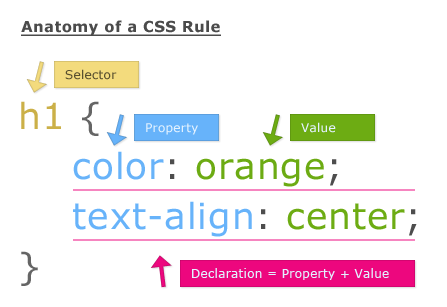
1. The Selector
The selector comes first. It sits outside the curly brackets and answers one question:
Which box do you want to style?
In the example above:
p {
    font-family: Arial;
}
p is the selector. It targets all <p> elements on the page.
Targeting Multiple Elements
You can apply the same style to multiple elements by separating selectors with a comma. This helps keep your CSS clean and readable.
h1, h2, p {
    color: darkblue;
}
This rule instantly makes all heading level 1, heading level 2, and paragraph text dark blue.
Think of selectors as filters. They decide which boxes receive the styles you define.
2. The Declaration
The declaration lives inside the curly brackets { }. This is where the actual styling happens.
A declaration is made of two parts:
- Property: what you want to change
- Value: how you want to change it
They are separated by a colon and always end with a semicolon.
p {
    font-family: Arial;
    color: #333333;
}
Breaking That Down
font-familyis the propertyArialis the valuecoloris the property#333333is the value
You can think of it as giving instructions:
- Change the font family to Arial
- Change the text color to dark gray
Each line is a single, clear instruction to the browser.
A Simple Syntax Rule to Remember
CSS is very forgiving, but one rule is non-negotiable:
- Property and value are separated by a colon
: - Each declaration ends with a semicolon
;
Following this consistently will save you from many frustrating bugs.
Putting It All Together
Every time you write CSS, you are doing the same thing:
- Selecting one or more boxes
- Declaring how those boxes should look
You are not fighting the browser. You are simply describing styles in a structured way.
Once this clicks, CSS becomes predictable and even enjoyable. You stop randomly tweaking values and start making intentional decisions.
Taking control of CSS is not about memorizing hundreds of properties. It is about understanding the structure behind the language.
When you know that everything is a box, and that every CSS rule is just a selector plus declarations, the rest becomes much easier to learn.
Leave a Reply